

DeepL Write
Revise sentences and passages with visible alternatives, language-variety controls, and selected-text access in documents.
Sources checked 3 October 2026.

PlansFree; paid add-on US add-on; Translator plan required
- Free
- Free
- Limited input length and feature availability; ten protected terms on the web in English and German.
- Write Pro add-on (annual billing)
- $7.49/month
- US price per user per month, billed annually, in addition to a qualifying Translator plan. The checked Individual base plan is $8.74 per month billed annually.
- Write Pro add-on (monthly billing)
- $9.49/month
- US add-on price per user per month, in addition to a qualifying Translator subscription.
Write Pro is an add-on to a qualifying Translator plan; the checked Individual base plan is $8.74/month billed annually.
View current plans (opens in a new tab)AI & setupAI includedFree Write access available
Paid Write features depend on the selected Translator plan or Write Pro add-on; a Translator subscription alone does not guarantee the same entitlement.
Where it worksWeb, macOS, Windows, iOS, AndroidWeb, desktop, mobile, Word, Docs
Account, plan, language, and surface determine which editing controls appear.
Usage & termsInput caps and tools varyCheck the language and surface
The help page lists 1,500 characters per free input, 2,000 for Translator Pro, and no input limit for Write Pro.
Style and tone controls exclude Chinese, Japanese, and Korean; alternative phrasing and shortening are unavailable on mobile.
Word has separate account and daily limits; the free Write allowance there is listed as 2,000 characters per day.
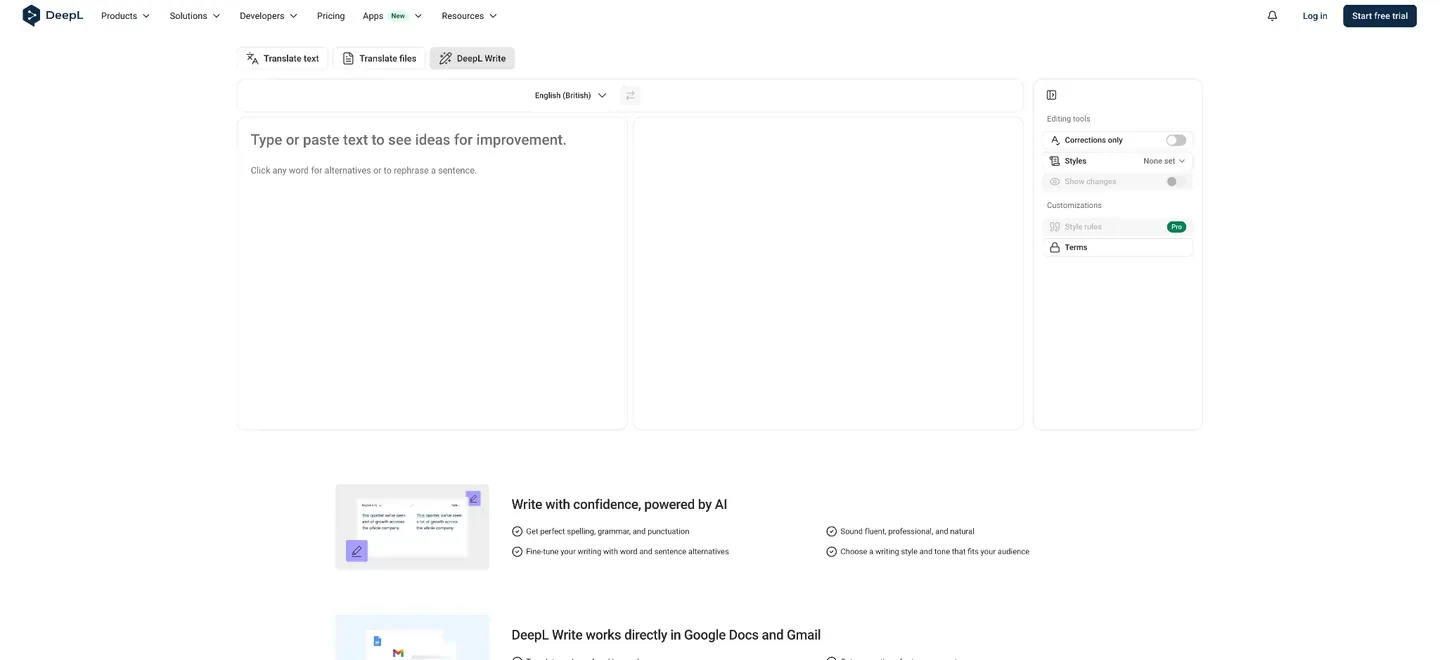
Compare the wording at two scales
The web and desktop interfaces place the original and revised text together, mark the edits, and offer alternatives for individual words or whole sentences. An author can refine a phrase without accepting every change to the passage. Read-aloud support also lets the original and revised versions be heard.
Revise for the language of the edition
The current help documentation lists English, German, French, Spanish, Italian, Portuguese, Chinese, Japanese, and Korean. Write can also recast English text using British or American conventions, useful when preparing copy for another edition while keeping the work in English.
Adjust the register and the length
Simple, Business, Academic, and Casual styles give revision a purpose. Tone choices include Friendly, Confident, Enthusiastic, and Diplomatic, while Shorten supplies several condensed versions to compare. These controls can bring a passage closer to the voice and space available for its intended publication.
Style and tone support varies by language and platform. Shorten and alternative phrasing are not available on mobile.
Terminology, integrations, and plan details
-
Keep the project's terms and conventions
-
On the web, Terms to never edit protects chosen English and German words from revision. Paid style rules can apply defined formatting and spelling conventions, including rules written in plain text. These controls give recurring terminology and house style a place in the revision process.
Free users can protect ten terms; Write Pro and the Write add-on remove that term limit. Style-rule languages and list allowances depend on the plan and rule type.
-
Work on the selected passage inside the document
-
Google Docs integration previews an improvement and lets the author replace the selection or keep the original. The Microsoft Word add-in has a separate Write view for improving selected text. Browser, desktop, and mobile access extend the same revision product to other writing surfaces, with different feature and usage limits.
Feature details & official sources
Purpose and capability information checked 3 October 2026.
Platform and pricing reference: 24 October 2026.
Recorded requirements and limits
- The current help page lists 1,500 characters per input without a paid account and 2,000 for Translator Pro users; Write Pro removes the input-length limit.
- Styles and tones are unavailable for Chinese, Japanese, and Korean, with additional differences between platforms. Alternative phrasing and shortening are unavailable on mobile.
- Terms to never edit is available for English and German on the web, with ten terms for free users and unlimited terms for Write Pro or the Write add-on.
- Paid Write access must be included in the selected plan or purchased as an add-on. A Translator subscription alone does not establish the same Write entitlement across plans.
- Word requires a DeepL account and applies its own plan-specific daily limits; free Write access there is listed at 2,000 characters daily.
- Official Write homepage (opens in a new tab)
- Write product overview (opens in a new tab)
- Current plans and Write add-on pricing (opens in a new tab)
- Languages, platforms, and text limits (opens in a new tab)
- Alternatives, changes, and English variants (opens in a new tab)
- Styles, tones, shortening, and protected terms (opens in a new tab)
- Paid style rules (opens in a new tab)
- Google Docs integration (opens in a new tab)
- Microsoft Word integration and daily limits (opens in a new tab)
Information may be inaccurate. Confirm details on the official website. Report errors to [email protected].