

Hemingway Editor
Spot dense or weak passages at a glance, then compare controlled rewrites and draft-level feedback in Editor Plus.
Sources checked 3 October 2026.

PlansFree; from $19.99 one-time AI Plus $100+/year; Classic one time
- Web Editor
- Free
- Editor Plus Individual 5K Annual
- $100/year
- 5,000 AI sentence rewrites per month; $8.33 monthly equivalent billed annually.
- Editor Plus Individual 10K Annual
- $150/year
- 10,000 AI sentence rewrites per month; $12.50 monthly equivalent billed annually.
- Editor Classic Desktop
- $19.99 one time
- Mac or Windows; does not include the new AI features.
AI & setupAI includedFree web editor
Editor Plus is $100/year for 5K or $150/year for 10K AI rewrites; the $19.99 one-time Classic desktop app works offline and does not include Plus AI tools.
Where it worksWeb, macOS, WindowsWeb, macOS, Windows
Plus can import and export DOCX, Markdown, and HTML files; Classic is a separate desktop purchase.
Usage & terms5K or 10K AI rewrites monthlyEach new alternative uses rewrite credits
Individual Plus 5K includes 5,000 generated sentence rewrites/month; Plus 10K includes 10,000. Grammar fixes and document feedback are advertised as unlimited.
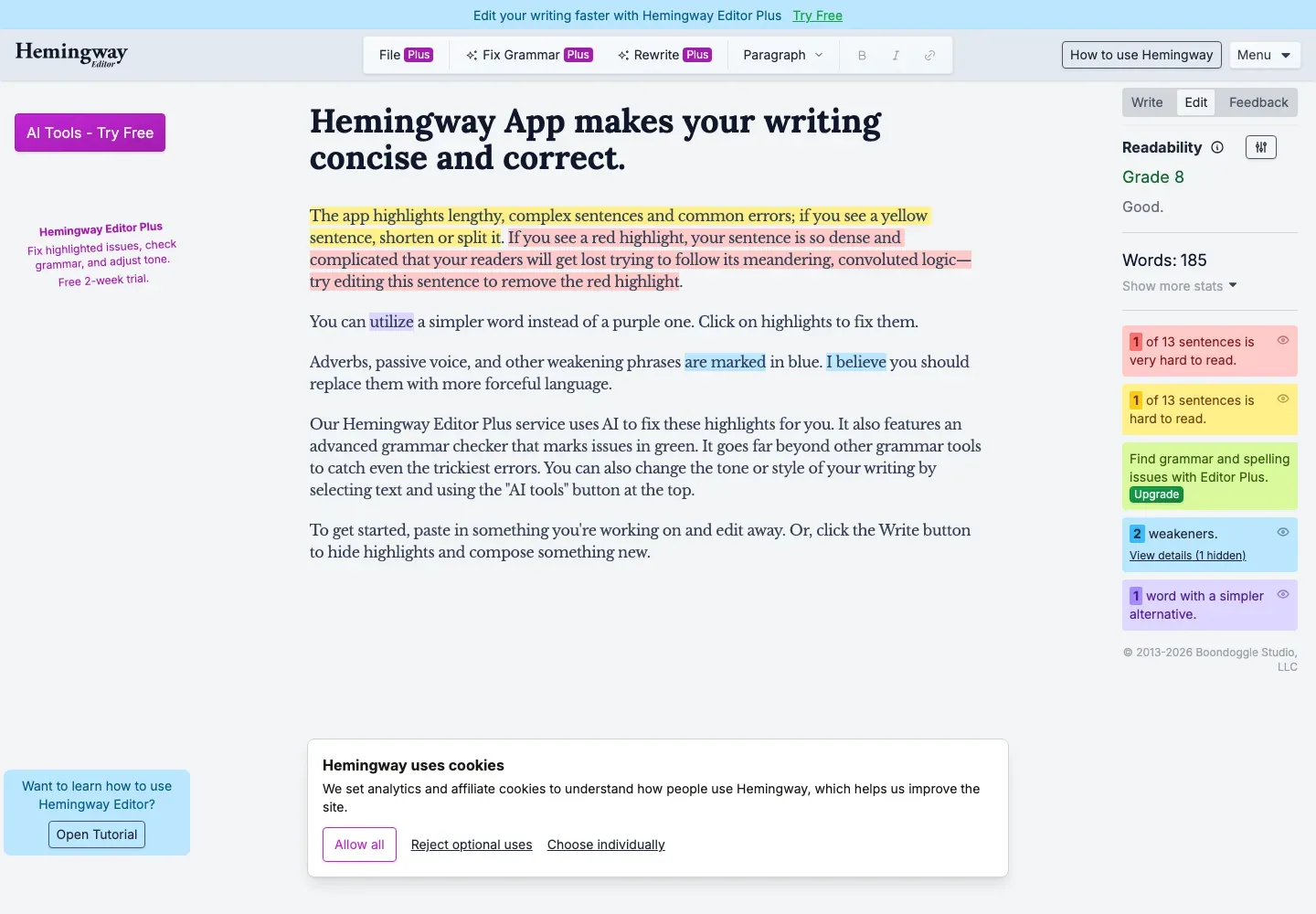
Find dense sentences without losing the surrounding text
Red and yellow highlights identify sentences above the target reading level. Other colors flag passive voice, adverbs, qualifiers, and words with simpler alternatives. The editor keeps those signals on the page so you can examine a passage in context.
Plus offers Accessible, Default, and Technical reading-level targets. The help guide treats scores and highlights as guides and explicitly allows long sentences that serve rhythm or a chain of thought.
Compare rewrites before replacing your words
Plus can simplify a highlighted sentence or rephrase selected paragraphs. You can request another alternative, move between the suggestions, and accept the version you prefer. Each generation generally uses one credit per sentence in the selection.
Rewrite controls and document workflow
-
Adjust tone, length, and the details of a passage
-
Rewrite controls can make text more formal, friendly, concise, or detailed. Custom instructions let you specify another change, and contextual synonym suggestions provide a smaller intervention when only a word or phrase needs attention.
-
Read a review of the draft's flow and logic
-
The Feedback tool produces a written review of structure, logic, flow, clarity, and tone, including strengths and suggested improvements. You can regenerate the analysis after revision. Plus also adds grammar, spelling, and punctuation fixes without spending sentence credits.
-
Bring a document in and take the revision back out
-
Plus imports and exports Word, Markdown, and HTML files. The separate Classic desktop edition offers offline readability editing and exports including Word and PDF, but has no Plus AI features.
Feature details & official sources
Purpose and capability information checked 3 October 2026.
Platform and pricing reference: 24 October 2026.
Recorded requirements and limits
- The AI features described here belong to Editor Plus, not every free or base version.
- Rewrites use sentence credits; new alternatives spend credits again. Grammar fixes and document feedback are advertised as unlimited on Plus plans.
- The separately sold Classic desktop app works offline and does not include Plus AI tools.
- Current free editor and product links (opens in a new tab)
- Editor Plus features and annual plans (opens in a new tab)
- Highlights, grammar, and sentence credits (opens in a new tab)
- Reading-level targets and statistics (opens in a new tab)
- Rewrite controls and instructions (opens in a new tab)
- Document feedback (opens in a new tab)
- Plus file formats (opens in a new tab)
- Classic desktop availability and price (opens in a new tab)
Information may be inaccurate. Confirm details on the official website. Report errors to [email protected].